
Beeminder Dashboard Widget

Wednesday, November 30, 2011
By dreeves

Text to display instead of the image if the image can't be displayed

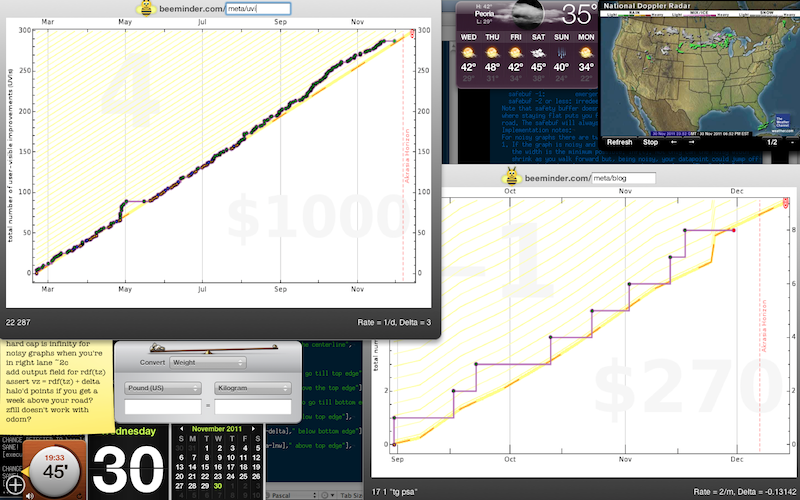
We’ve been using a simple Mac dashboard widget that esteemed co-founder Bethany hacked up to keep an eye on our Beeminder goals since before Beeminder was Beeminder. Here’s what it looks like on Dreeves’s computer:
Text to display instead of the image if the image can't be displayed

We mostly use it for TagTime-based goals, where the data is added automatically. For other goals we should probably add a text box for quickly adding data. Currently you can click on the graph and it takes you to the website where you can do that.

We find this thing immensely useful. So, with mere hours left to save ourselves $270, we thought we’d announce here that you can now use it too:

beeminder.com/beeminder.zip

(Instructions: Open the zip file and double-click the widget thingy)

Enjoy!

Tags: , , ,

  • http://skritter.com Nick

    Nice work! A little smaller would be nice, so I can put four of them on there.

  • Ezra Bradford

    I observe I no longer get my latest datapoint in the lower-left.

  • Ezra Bradford

    The labels in the lower-right are gone. It seems to be using the color coding from the web interface, but the color coding works there because I can get a tooltip. With no tooltip here, there’s no way to tell which number is which without (a) practice or (b) opening the website.

  • Ezra Bradford

    Also, the three numbers are in a different order than on the website. Is this intentional?

  • Daniel Reeves

    Hi Ezra! We need to update this widget to the new Beeminder API! In the meantime, you can work around the first problem by setting your data to be public in Advanced Settings.

  • Daniel Reeves

    Not intentional! I’m getting this stuff onto a Trello card now: https://trello.com/c/mYv21NUw

    Which reminds me I need to convert the awesome google doc you made for us to Trello! Still some things outstanding from that list.

    Thanks so much for all the help and feedback!

  • Daniel Reeves

    Wait, sorry, totally confused. That was Ezra Gorman. You’ve been awesome too though! :)

  • Daniel Reeves

    Wait, this is the problem I was referring to when I said the workaround is to make your data public in Advanced Settings.

  • Ezra Bradford

    Something I (or you?) did made this come back, even though my data is still private. More info to follow if I can figure out _what_, since that sounds like a potential security leak.

  • Ezra Bradford

    If you don’t need the data at the bottom, you can get a little smaller using Safari Web Clips instead.

    • Load up your goal page in Safari
    • Choose “File > Open in Dashboard…”
    • Click your graph
    • Click “Add” in the top-right

    You can of course go get the Goal Stats (or Progress, or Legend, or whatever you like) in a separate widget.

    Once you have a widget, the ℹ icon that appears when you mouse over its lower-right corner customizes the frame, and ⌘R refreshes it.

  • Ezra Bradford

    Upon inspection, the (non-resizable) widget seems to be showing the graph stretched larger than the image’s apparent natural 696×453 resolution. It’s up closer to 760×520 or so, and the stretching shows clearly on the text labels.

  • http://skritter.com Nick

    Thanks Ezra–that’s handy. I now have 15 Beeminders going, which doesn’t scale to the dashboard widget no matter how small you go, so now I’m just putting them all in a bookmark folder and hitting it each night before bed. Perhaps if I simplify my Beeminding next year, I’ll web clip.

  • Ezra Bradford

    Hi Nick,

    If I had fifteen Beeminders like you, here’s how I’d do it:

    • Archive the rest (with that little minus button).
    • Web Clip the whole active goals section of my Beeminder homepage.
    • Put that widget next to the official widget, just like this new screenshot
    • Type in the slug of any particular graph to view it

    Or, if you don’t like to type slugs, just click a graph on the left to open it in your default browser.